- Monitor any Device on the School Network
- Complete Coverage for any internet capable device
- OCR technology captures typed & non-typed incidents – Online & Offline
- Sophisticated Library Monitoring 25 Topics of concern
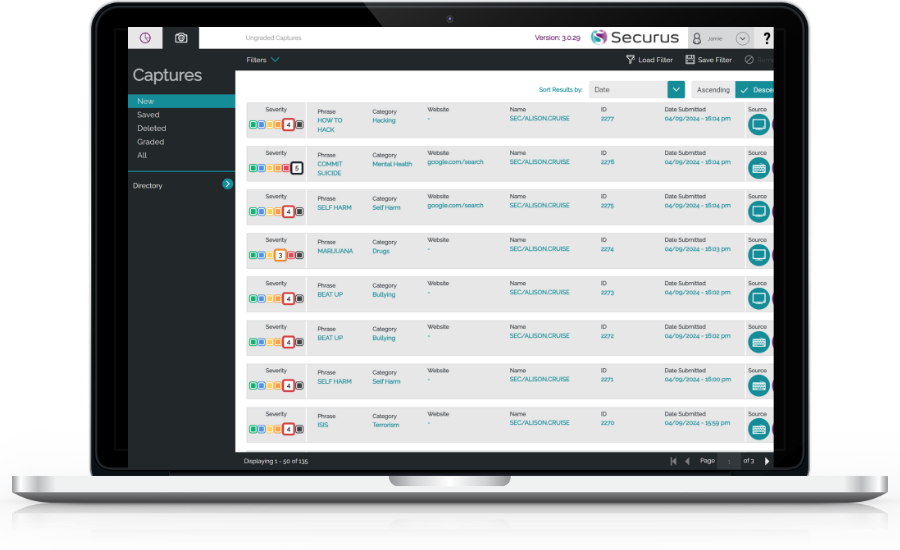
- Detailed screenshot evidence highlighting capture words & phrases in real time
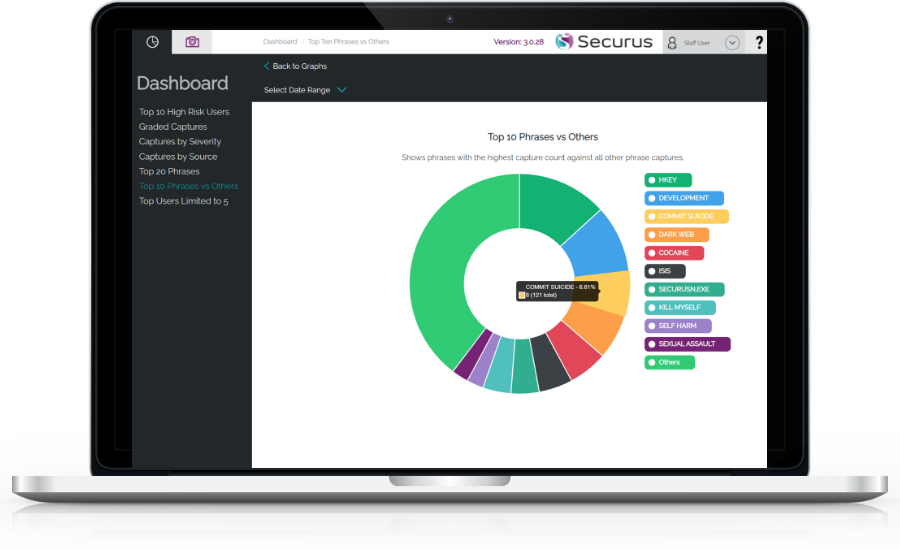
- Dashboard & Reporting Platform
- Self Managed Monitoring or human-moderated Full Monitoring Solution
- Integrations with CPOMS, MyConcern & teamSOS
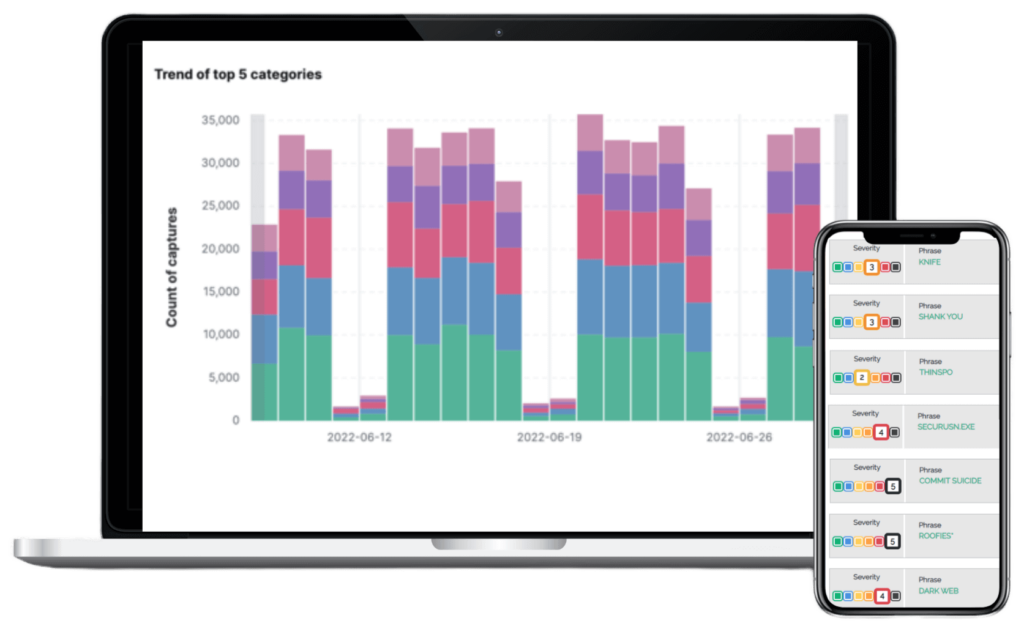
- AI-enhanced trend recognition and prioritisation
Solutions:
Securus Digital Monitoring
Digital Monitoring for Education
Real-time device and network level monitoring covering all applications and devices. With our human-moderated Full Monitoring Solution, or as Self Managed Monitoring for DSLs to self-monitor captures.
Securus Monitoring Solution Overview
Securus Full Monitoring Solution (FMS)
Human-moderated monitoring by our team of qualified child safeguarding experts who monitor captures and alert school staff only where neccessary.
Human-moderated
Let our expert safeguarding team monitor and analyse activity. All of our moderators maintain the highest levels of safeguarding certification and training.
Save staff time
Do away with workload and time constraints on school DSL & IT staff who must monitor digital activity in line with DfE, KCSiE and Ofsted guidance.
Securus Self Managed Monitoring
Market-leading digital monitoring software and capture management portal designed for designated school staff to monitor potential safeguarding concerns.
Intuitive interface
Sophisticated yet easy to use cloud-based capture management portal categorises and stores all captures for review by designated school staff.
Support and training
Unlimited online training and access to our Support team & Knowledge Base – all part of our cost-effective self managed monitoring solution.
Monitor across all applications and device types
Easily connect with CPOMS, MyConcern and teamSOS
Capture untyped incidents unseen by keystrokes
The Securus Library Covers 25 Topics of Concern
Full Device & Network Safeguarding Coverage
The Securus installation is quick and easy and aligns with the school's structure, policies and AUP. The Securus Support Team are on hand for configuration and setup for both our Full Monitoring Solution and Self Managed Monitoring.
Device Level
Monitoring
Monitoring
- OCR Screen Scanning Technology
- Alerts & Dashboard Reporting
- CPOMS & MyConcern Integration
MS Windows Workstations and Laptops
The Securus cloud based MSI client for MS workstations and laptops can be deployed via Group Policy, SCCM, Intune or any other software deployment program. It can also be manually deployed.

Google Chromebooks
The Securus device application for Chromebooks is a Google verified extension deployed using Google Workspace from the Chrome Extension Webstore.

Apple iPads
The Securus Safeguard Browser for iPads is an Apple verified default browser deployed via MDM using our unique .PLIST file to connect the app to your Securus environment.

Network Level
Monitoring
Monitoring
- Alerts & Dashboard Reporting
- CPOMS & MyConcern Integration
Mac Computers and MacBooks
Apple Macs are monitored at the network level. An explicit proxy is installed to a Virtual Machine that monitors the device browser traffic.

BYOD – Personal Devices, Mobile and Android
Securus BYOD is a network level solution to provide enhanced multi-platform safeguarding coverage for ALL personal devices connected to and using the school network and Wi-Fi resources in support of the organisations BYOD policy.

Securus Monitoring Key Benefits
See hidden risks
Monitor all applications and device types
Our device & network-level monitoring allows for complete coverage across all applications and school devices including iPads, Mac and Windows computers, Chromebooks, Android, and more.
Capture typed and untyped risks
Securus can see more than just keystrokes. Our unique OCR technology allows for capture of untyped risks - 95% of which are invisible to other monitoring and filtering systems.
Works online and offline
Monitoring runs continually in the background, regardless of whether the device is connected to a network. Offline captures sync to the Console for review when the device re-connects.
Provide appropriate monitoring
Full compliance with DfE, KCSiE & Ofsted
Comply with recent safeguarding leglislation requiring schools and colleges in England and Wales to provide appropriate levels of monitoring.
Real-time monitoring and alerts
Alerts for high-severity incidents are sent immediately via email and SMS for the DSLs attention. The highest severity alerts are also followed up with a phone call.
Sophisitcated library of concerns
Our library of keywords is built upon 20+ years of expertise in child safety and is continously updated, covering 25 Topics of Concern such as mental health, grooming, radicalisation, drugs, gangs, suicidal ideology, self-harm and more.
Save staff time
Human-moderated
Let our expert safeguarding team monitor and analyse activity. All of our moderators maintain the highest levels of safeguarding certification and training.
Reduce false positives
Low level captures are stored silently in the Console with only the highest severity captures triggering alerts. In addition, specific words and phrases can be excluded from monitoring.
Fast deployment & auto-update
Securus can be deployed quickly and updates happen automatically. For Multi Academy Trusts a single deployment can provide coverage to all schools at the Trust-level.
Why Schools Need Digital Monitoring
Securus software has been rigorously designed to meet the DfE statutory safeguarding and legislative requirements & adheres to the Education Inspection Framework for Ofsted & the ISI.

In September 2023 Ofsted updated its five-year framework, first unveiled in April 2022 with Keeping children safe, one of eight Strategic priorities stating that they “… will promote children’s safety and welfare in everything we do and highlight systemic safeguarding issues wherever we find them, so that schools and other education providers or other appropriate agencies can take preventative action”.
Effective 1 September 2026, the updated KCSiE 2026 Guidance introduces significant new legal requirements. Annex A is replaced by a new online Part one: overview for all staff quick-reference guide, though all staff are mandated to read Part One in full.
Other major revisions include new statutory procedures for gender-questioning pupils, stricter DBS tracking for volunteers, and robust safeguards against AI deepfakes.


As part of the guidance contained in the Counter-Terrorism and Security Act 2015, The Prevent duty is intended to help schools and childcare providers think about what they can do to protect children from the risk of radicalisation and being drawn into terrorism.
The Independent Schools Inspectorate is appointed by the DfE to inspect all aspects of school life in association independent schools in England.
In line with statutory guidance inspectors assess whether schools “have in place arrangements that reflect the importance of safeguarding and promoting the welfare of children” Safeguarding is embedded throughout the regulatory requirements that ISI inspects against and evaluated on every inspection.
What Our Customers Say
Paul Wade, ICT Manager at St. Mary's College, Derry on how Securus protects children in primary schools.
Nigel Arnold, Principal at Glengormley Integrated Primary School on how Securus fits into the eSafety toolbox.